Part 1, where I laid out the idea, is here.
I love golf, but work keeps me busy and I rarely make it to a course. So instead of spending thousands on a garage simulator, I set out to build the golf game myself. Here it is: an 18-hole screen golf game you can play right in your browser.
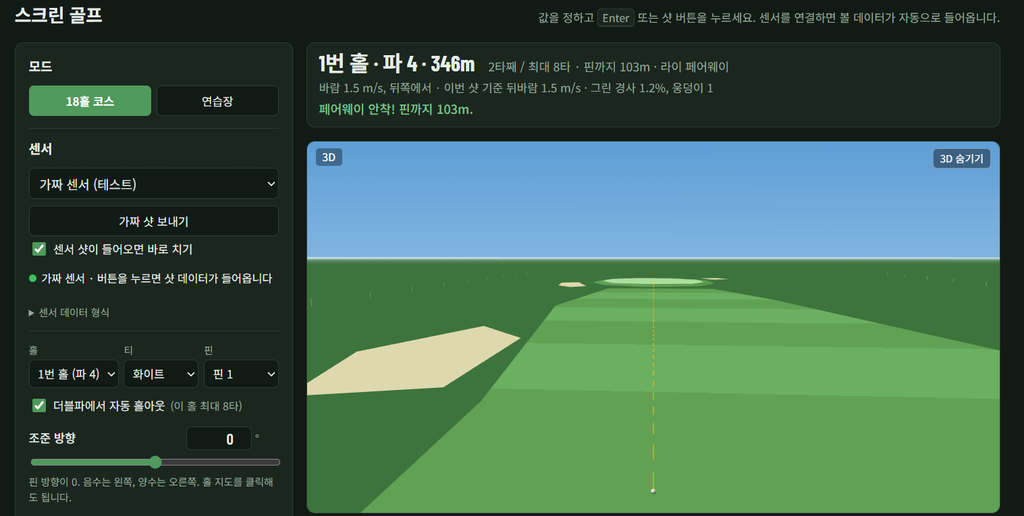
Why build it myself?
A launch monitor, simulator software and a screen add up fast. I didn’t need a perfect setup on day one. I needed a game I could actually play, and a way to grow it over time.
My tool was Claude Code, an AI coding assistant. I described what I wanted in plain words, it wrote the code, and I opened the result in my browser and pointed out what to fix.
What it does
- 18 holes, par 72: every hole has its own par, length, fairway shape, bunkers and green, with selectable tees and pin positions
- 8 clubs: driver, 3-wood, 5/7/9-iron, pitching wedge, sand wedge and putter
- Ball-data shots: enter ball speed, launch angle, direction, backspin and sidespin; the ball flies, curves in the wind and rolls out
- Wind and greens: each hole has its own wind, and greens have slope and breaks
- Three views: 3D, a side-view trajectory and a hole map you can click to aim
- Scorecard with autosave: close the tab and pick up where you left off, with optional pickup at double par
- Driving range mode: check your carry by club
I hit a drive
On Hole 1 I chose the driver and entered a ball speed of 65 m/s (about 145 mph), a 13° launch angle and 2,700 rpm of backspin, with a 1.5 m/s (about 3 mph) tailwind.
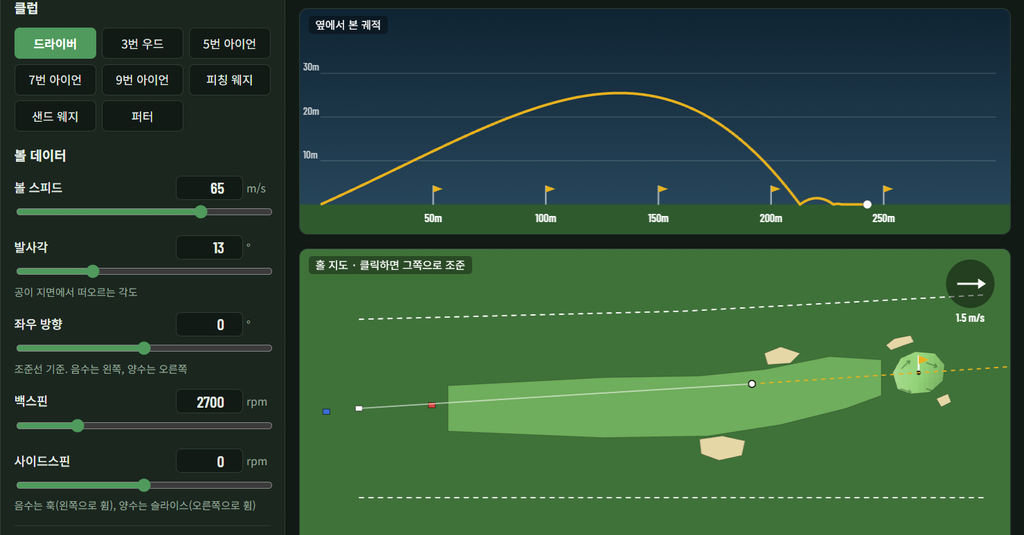
The ball peaked at about 25 m, landed in the fairway and rolled out roughly 30 m.
| Stat | Result |
|---|---|
| Carry | 212.9 m (233 yd) |
| Total distance | 242.8 m (266 yd) |
| Peak height | 25.5 m (84 ft) |
| Offline | 0 m |
| Hang time | 6.0 s |
| Descent angle | 34.8° |
With that ball speed, a real drive carries in the low 200s of meters too, so the ball flight feels believable.
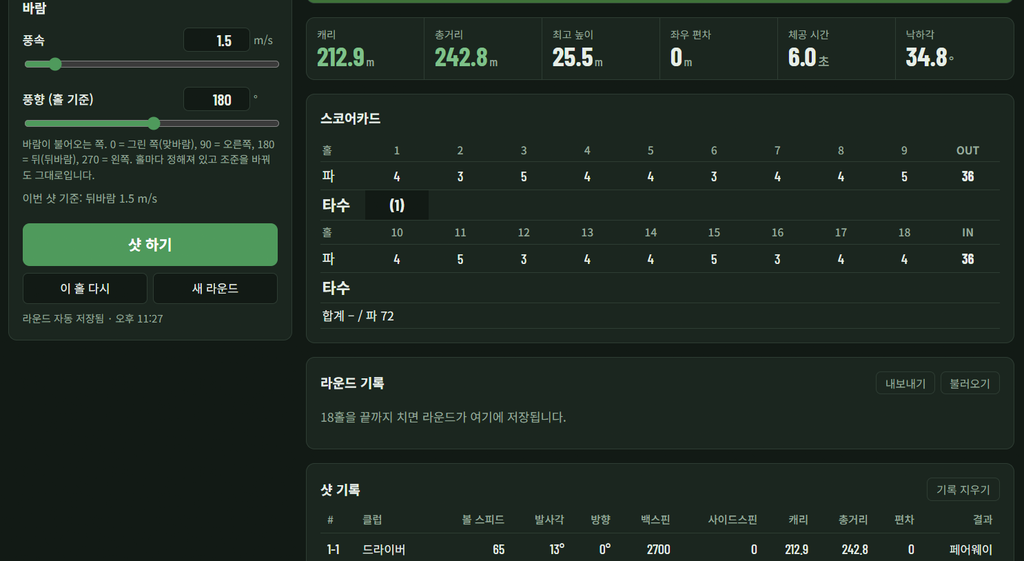
Every shot is logged with the club, ball data, distance and result (fairway, bunker and so on). Finish all 18 holes and the round is saved to your history, which you can export or import as a file.
Sensors: still in testing
For now you enter shot values by hand or use a built-in “fake sensor” button. The game is ready to accept live ball data from a real sensor, and I included an Arduino sensor example and a test server. Real swing detection is the next step.
Try it yourself
It runs right in your browser. It needs a wide screen, so a desktop or laptop works best.
Once the game opens, pick a club, adjust the ball data, and press the green 샷 하기 (Shoot) button.
What I learned
The whole build took about four hours. My only coding background is a two-month course, so writing it all by hand would have taken far longer.
The hardest parts were designing the 18 holes and getting the 3D view right. Every hole needed its own par, length, fairway shape, bunkers and green, and the 3D course had to line up exactly with the hole map.
What surprised me most is how far you can get just by describing what you want and pointing out what looks wrong on screen.
What’s next
Connecting a real sensor so I can swing a club, then building fantasy courses, think space and other planets. I’ll post updates here.
Pingback: I Built a Golf Hole on the Moon: A 1.7 km Drive in One-Sixth Gravity (Build Log Part 3) – Garage Golf Lab