This time I added a caddie voice to my screen golf game. Before every shot she tells you the distance to the pin, the wind, a suggested club and which bunker to avoid. After the shot, she tells you how it went.
If you have played golf in Korea, you know the caddie. Each group goes out with one, usually a young woman who calls out yardages, hands you clubs, reads the greens and drives the cart. A cheerful “Nice shot!” from her can lift your whole round. For many golfers outside Korea, it is one of the most surprising parts of playing there.
Playing screen golf alone in front of a monitor, that voice is missing. Every number is on the screen, but hearing someone say it is a different feeling. So after building the Mars course in Part 4, a caddie was my next feature.
As before, I described what I wanted to Claude Code, listened to the result and asked for fixes.
What the caddie says
The caddie talks twice per shot: once before and once after. Like a real caddie, she keeps it to one or two short, upbeat sentences.
| When | What the caddie says (examples) |
|---|---|
| Start of round | “Hello! Let’s have a great round together.” |
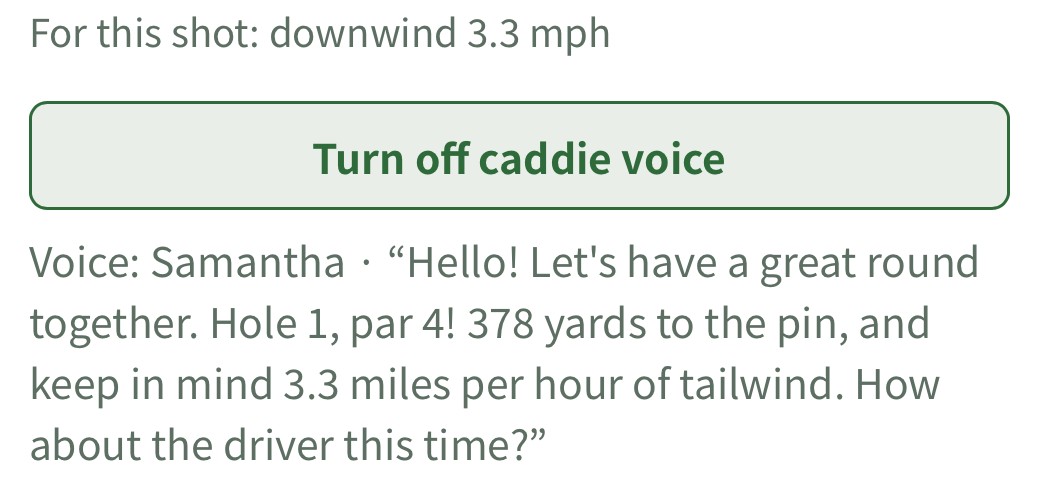
| Before a shot | “Hole 1, par 4! 378 yards to the pin, and keep in mind 3.3 miles per hour of tailwind. How about the driver this time?” |
| Fairway | “Nice shot! Right in the fairway.” |
| On the green | “Wow, you’re on the green!” |
| Bunker | “Oh, that’s in the bunker. Stay calm and splash it out!” |
| Out of bounds | “Oh no, that’s OB. One-stroke penalty, let’s hit another.” |
| Mars crater | “Oops, that’s in a crater. Take your time getting out!” |
I wrote 64 lines each in Korean and English. Most situations have two or three versions, and the caddie never repeats the line she just said. Distances and wind follow your unit settings (meters or yards, m/s or mph).
In Korean, she calls you gogaek-nim, a polite “dear guest”, just like caddies do at Korean courses.
The caddie voice is off by default and turns on with a button. Browsers often block sound on a page until the visitor clicks something. Everything she says also appears as text under the button, so you can read it with the sound off.
Finding the right voice was the hard part
The lines were easy compared with the voice. The caddie uses the speech feature built into your browser, with no extra server. It costs nothing, but your device and browser decide which voice you hear.
In Chrome on Windows, I got Heami for Korean and Zira for English. Both are older Windows voices: the Korean sounded stiff and the English sounded middle-aged.
Microsoft Edge includes much more natural voices for free, so I tried Edge. English switched right away to a bright voice called Jenny. Korean was still Heami.
The cause was surprising. Edge lists the Korean voice SunHi under its Korean name, “Microsoft 선히 Online (Natural)”. The code was searching only for the English spelling “SunHi”, so it never found her. Once it searched for both names, SunHi came through.
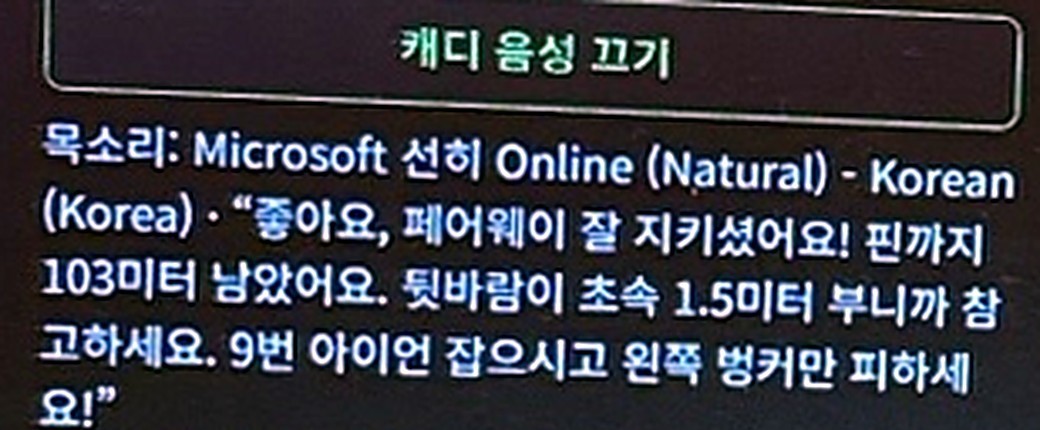
I also fixed one pronunciation. Korean golfers say “par four” in English (“파 포”), not the Korean number. The screen still shows “par 4”, but the Korean voice now says “pa three, pa four, pa five” the way caddies do.
Here is which voice you get on each device.
| Device and browser | Korean | English |
|---|---|---|
| Windows + Edge | SunHi | Jenny |
| Windows + Chrome | Heami | Zira |
| iPhone Safari | Yuna | Samantha |
Edge sounded the most natural, and the iPhone voices were perfectly fine too. On Windows, I recommend Edge.
Still to do
- Different voices on different devices: to give every visitor the same voice, I would need to fetch it from a speech service such as Microsoft Azure through my server. I may do that if traffic grows.
- Club advice and wind: the caddie picks a club from distance only and ignores wind. In a strong headwind she may suggest one club too short, so that is next on the list.
This update did not change the physics on Earth, the Moon or Mars. The caddie only describes what happened; she does not touch how the ball flies.
Hear it yourself
The caddie is live in your browser. Open the game, press Turn on caddie voice and hit a shot. On Windows, Edge sounds best.
If you land in a crater on the Mars course, she has something special to say. You will have to find out what.